DMARC management platform for visibility and control
DMARC helps protect your domain from spoofing and gives you visibility into who’s sending email on your behalf. Sendmarc provides a practical way to implement, monitor, and enforce DMARC across your domains.
What DMARC helps you achieve
When DMARC is set up correctly, it can help you:
Reduce spoofing and impersonation risk
DMARC lets you publish a policy for how receivers should handle email that fails authentication and alignment, which helps reduce spoofed messages that use your exact domain.
Gain visibility into who’s sending from your domain
DMARC provides reporting so you can see sending sources and authentication outcomes, which helps you find unknown senders and fix misconfigurations faster.
Improve deliverability for legitimate email
DMARC reduces authentication-related blocking and helps you catch alignment issues early through reporting.
Meet regulatory requirements
DMARC is increasingly mandated by regulators, government bodies, and mailbox providers; implementing it helps you stay compliant.
Minimize shadow IT
DMARC improves visibility into unsanctioned senders so you can address them faster.
Reduce IT burden
A DMARC platform can streamline monitoring, issue resolution, and reporting, saving time for IT teams and cutting down on manual effort.
Understanding DMARC
DMARC is a protocol that lets a domain owner publish a policy for how receiving systems should handle email that uses the domain. It also provides reporting, so you can see who’s sending on your behalf and spot authentication issues.
DMARC builds on SPF and DKIM. It checks whether SPF and/or DKIM use the same domain as the visible “From” address, then applies your policy if alignment fails.
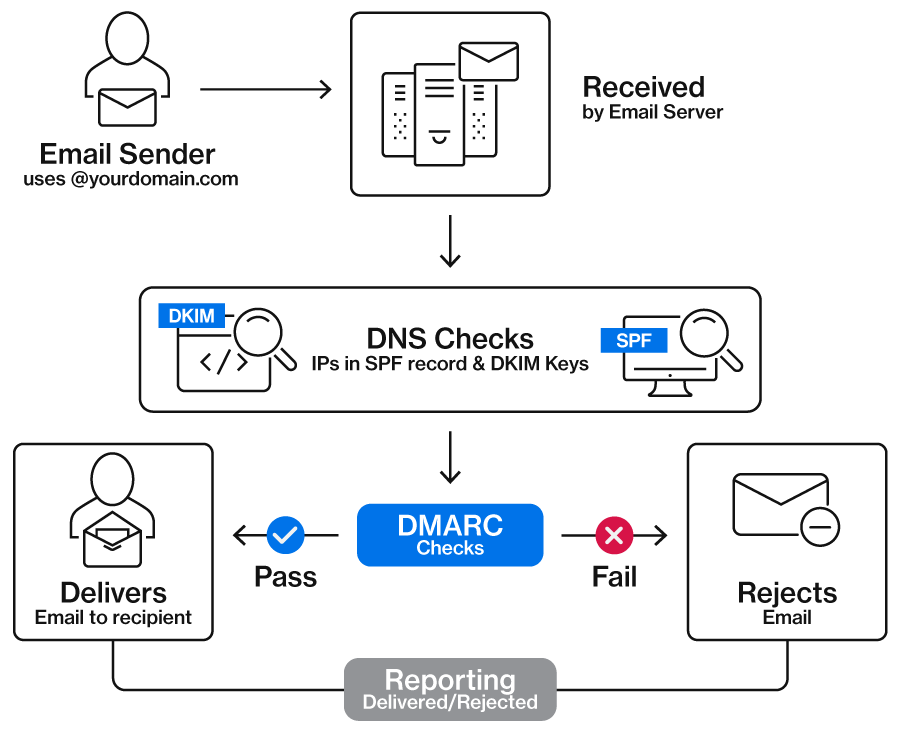
How DMARC works in four steps
SPF and DKIM are evaluated
The receiving server checks SPF to confirm the source is authorized to send for the domain, and DKIM to confirm the message is signed and unaltered.
DMARC checks alignment
DMARC checks whether the domain that passed SPF and/or DKIM matches the domain in the visible “From” address.
DMARC applies your policy
DMARC uses your published policy to tell receivers how to handle messages that failed authentication.
DMARC reports what receivers see
DMARC aggregate reports show which sources are sending email from your domain and how those messages performed against authentication checks over time.
DMARC policies explained
p=none (monitor)
What it does:
Tells receivers to deliver email normally, even when a message fails DMARC, and to send reports
When to use:
Use p=none to identify legitimate senders and reduce surprises before stricter enforcement
p=quarantine
What it does:
Tells receivers to treat messages that fail DMARC as suspicious, which may result in Spam or Junk placement
When to use:
Use p=quarantine while you confirm that all legitimate systems have been correctly configured
p=reject
What it does:
Tells receivers to reject messages that fail DMARC
When to use:
Use p=reject once you’ve confirmed all legitimate sending sources are authenticated and aligned
p=reject provides the strongest protection against spoofing.
Sendmarc helps you reach p=reject without disrupting critical email.
Why DMARC projects stall
DMARC is straightforward, but real sending environments change constantly. The most common challenge is visibility. Without a clear view of every system that sends email on behalf of your domain, moving to enforcement can feel risky.
Operational realities add friction, too. DMARC reports often arrive as XML files, which are hard to interpret without the right tools. Ownership can also be unclear in larger organizations, especially when multiple domains, business units, and teams share responsibility for email sending.
Finally, SPF can get complicated as you add more senders. Larger SPF records can exceed lookup limits and cause failures.

Protect against identity-based attacks
Identity-based email threats most often happen in one of three ways: Attackers spoof your brand, impersonate you with a lookalike domain, or exploit a compromised mailbox.
Sendmarc helps you close these gaps by bringing domain authentication and identity threat signals into one clear view.
DMARC
Implement DMARC to reduce spoofing. Get clear visibility into alignment and policy status across all senders so you can move to enforcement safely.
Lookalike Domain Defense
Detect and monitor lookalike domains that may be used to impersonate your brand. Identify risky domains early so your security team can investigate and reduce the likelihood of phishing and fraud attempts.
Breach Detection
Spot early warning signs of compromised accounts and respond faster with actionable alerts. Breach Detection helps security teams prioritize investigation and contain incidents before attackers can do more damage.
Ready to reduce impersonation risk?
Get visibility into spoofing, lookalike domains, and compromised accounts – and take action faster with Sendmarc.
DMARC FAQs
What is a DMARC record?
A DMARC record is a DNS TXT record that lists your DMARC policy and reporting destinations. A DMARC record tells receiving systems how to handle messages that fail DMARC checks and where to send DMARC reports.
Do I need DMARC if I already have SPF and DKIM?
Yes, you still need DMARC even if you already have SPF and DKIM in place. DMARC publishes a policy that tells receivers how to handle failures and enables reporting, which shows you which senders use your domain and where authentication is failing.
Can I publish more than one DMARC record?
No, you should only publish one DMARC record per domain. Subdomains can have their own DMARC records, which might be different from the policy set on the root domain.
How can I validate my DMARC record?
You can validate a DMARC record by checking that the DNS TXT record is published at _dmarc.yourdomain.com and that the syntax is correct, including required tags like v= and p=. You can also use Sendmarc’s DMARC checker to test your configuration and catch issues.
If you need to make changes, Sendmarc can automate the required DNS updates via Entri – so you don’t have to edit records manually.
What do I do if my DMARC policy is incorrect?
An incorrect DMARC policy can cause two problems. It can block legitimate email, or it can fail to prevent spoofing. A common DMARC rollout approach is to start with p=none, move to p=quarantine, and then to p=reject once legitimate senders are authenticated and aligned.
Does DMARC prevent all phishing?
No, DMARC doesn’t prevent all phishing. DMARC can reduce phishing that spoofs your domain in the visible “From” address, but it doesn’t stop lookalike domains, compromised accounts, or social engineering. DMARC is most effective when combined with user training and other security controls.